
The #1 Bookkeeping Task Business Owners Miss: Reconciliation
The Essential Step Most Business Owners Skip — and Why It Matters
RECONCILE, RECONCILE, RECONCILE
Of all the bookkeeping tasks business owners skip, reconciliation is the one that causes the most damage. It’s not glamorous, but it’s essential. Reconciling means comparing the transactions and ending balance on your bank or credit card statement to what’s in your accounting system — and making sure they match.
This one task is the difference between accurate books and financial chaos.
Before You Reconcile: Prep Matters
Make sure these two things are done first:
All sales and deposits are entered
All expenses are entered
Why Reconciliation Matters
Reconciliation is how you confirm your books are accurate. It helps you catch:
Duplicate transactions
Missing transactions
Transaction errors
Timing issues (like outstanding checks or deposits in transit)
If you’re not reconciling, you’re not seeing the real financial picture.
How to Reconcile (Quick Overview)
Start with your bank statement
You need the actual bank statement for this process. If you don’t receive your monthly statement in the mail you can download it from your online banking portal.
Below are instructions to reconcile accounts in an accounting system, such as QuickBooks:
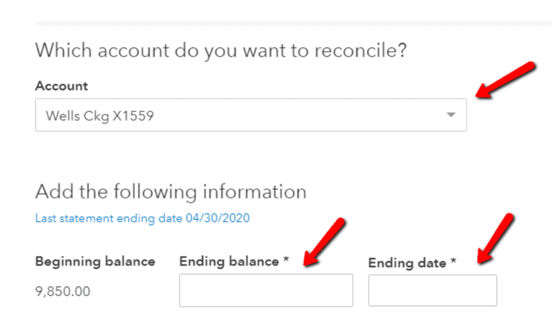
2 .Enter the statement details
In the reconciliation module select the account to reconcile. Enter the ending statement balance and the ending statement date. (See picture below.)
Match Transactions
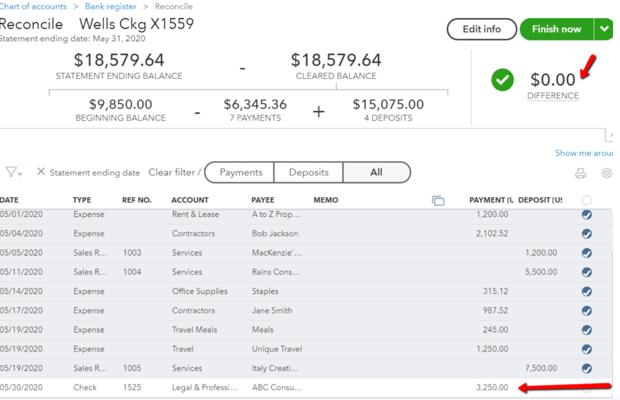
Check off each transaction on the reconciliation screen as you find it on the statement. In the picture below, all of the transactions on the statement have been marked off. There is one item not on the bank statement. See #4 for how to handle it.
Investigate anything unmatched
If a transaction is on the statement but not in your books → enter it.
If a transaction is in your books but not on the statement → determine why.
·Duplicate? Delete it.
·Outstanding check? Leave it unchecked.
·Deposit in transit? Leave it unchecked.
In the picture above, there is one item not on the bank statement. It’s the item not checked off. This transaction is a check that was written on the last day of the month. It’s considered outstanding or in transit since it hasn’t cleared the bank. We will leave it on the screen unchecked. On next month’s reconciliation, it will appear on the screen again. If it has cleared the bank, it will then be checked off.
Confirm the difference is $0
Once everything matches, your reconciliation should be in balance.
A Note on Outstanding Items
If a check or deposit hasn’t cleared yet, it won’t appear on your statement. That’s normal. Just remember:
Your bank balance won’t include these items
Your accounting system should reflect them
Your true available balance is the bank balance minus outstanding checks
This is why reconciliation matters — it prevents you from thinking you have more cash than you actually do.
PRO TIP:
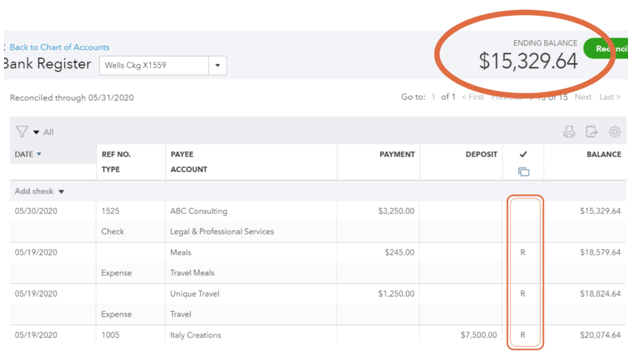
In this picture, you will notice the column labeled with a checkmark that I boxed in.
In your accounting system, the checkmark column tells you the status:
Blank = not cleared
C = cleared but not reconciled
R = fully reconciled
Your bank register is a powerful tool for seeing the true financial picture.
How Often Should You Reconcile?
Bank & credit card accounts: monthly
Loan accounts: at least quarterly (monthly is even better)
Accurate reconciliations lead to accurate financial reports — and accurate reports lead to better decisions.
Final Thought
Reconciliation isn’t optional. It’s the only way to know your books are complete and accurate.
If reconciliation feels overwhelming or you’re not confident your books are accurate, we can help. Our team reconciles accounts monthly, ensures your books stay clean, and gives you the clarity you need to run your business with confidence. Book a call here!
The article is for informational purposes only. Details are subject to change without notice.
Copyright © 2019-2026, Alpha Omega Consulting & Bookkeeping, LLC | ALL RIGHTS RESERVED